custom stickers
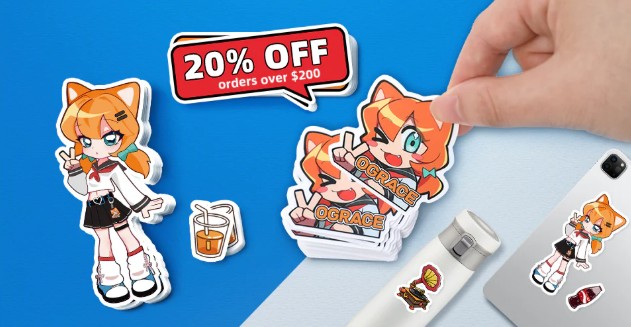
Custom stickers have become one of the most versatile and creative tools for personal expression, branding, and marketing. From small businesses and startups to artists and hobbyists, custom stickers are an affordable, impactful way to communicate a message, promote a brand, or simply add personality to everyday items. Whether you want stickers for packaging, giveaways, events, or personal use, designing them thoughtfully is the key to standing out.
In this step-by-step guide, you’ll learn how to design custom stickers from concept to print, with practical tips to ensure your stickers look professional, eye-catching, and purpose-driven.
Step 1: Define the Purpose of Your Custom Stickers
Before you start designing, it’s essential to understand why you’re creating custom stickers. A clear purpose will guide every design decision.
Ask yourself:
- Are these stickers for branding or marketing?
- Are they meant for decoration or personal expression?
- Will they be sold, given away, or used internally?
- Who is your target audience?
For example:
- Businesses often use custom stickers for logos, packaging seals, or promotional giveaways.
- Artists and creators may design stickers to showcase illustrations or personal style.
- Event organizers might create stickers as souvenirs or promotional tools.
Defining the purpose helps you choose the right design style, size, colors, and messaging.
Step 2: Choose the Right Sticker Type and Format
Not all custom stickers are the same. Selecting the right type ensures your design works well in real-world use.
Common Types of Custom Stickers
- Die-cut stickers: Cut to the exact shape of your design. Ideal for logos and illustrations.
- Kiss-cut stickers: Stickers are cut through the top layer only, leaving a backing sheet. Great for sticker sheets.
- Vinyl stickers: Durable, waterproof, and perfect for outdoor or long-term use.
- Clear stickers: Printed on transparent material for a clean, modern look.
- Holographic or metallic stickers: Eye-catching and trendy for premium designs.
Consider where your stickers will be used—laptops, water bottles, packaging, cars, or notebooks—to determine the best material and finish.
Step 3: Brainstorm Your Design Concept
Now comes the creative part. Start with brainstorming ideas that align with your purpose and audience.
Tips for brainstorming:
- Sketch rough ideas on paper.
- Collect inspiration from other sticker designs (but avoid copying).
- Think about symbols, icons, typography, or characters.
- Decide whether your design will be text-based, image-based, or a combination.
When designing custom stickers, simplicity is often more effective. Stickers are usually small, so your message should be clear at a glance.
Step 4: Select Colors Strategically
Color plays a major role in how custom stickers are perceived.
Color Tips for Custom Stickers
- Use high-contrast colors to make designs readable from a distance.
- Limit your palette to 2–5 colors for a cleaner look.
- Choose colors that reflect your brand identity or theme.
- Consider how colors will appear on different backgrounds.
For branding stickers, using consistent brand colors helps improve recognition. For artistic or personal stickers, bold or playful colors can make your designs more appealing.
Step 5: Pick Fonts That Are Clear and On-Brand
If your custom stickers include text, font selection is critical.
Best practices:
- Use legible fonts, especially for small stickers.
- Avoid overly decorative fonts that are hard to read.
- Pair fonts carefully—one primary font is often enough.
- Make sure text size is readable when printed.
For business stickers, clean sans-serif fonts often work best. For creative designs, hand-lettered or playful fonts can add personality, as long as readability is maintained.
Step 6: Use the Right Design Software
You don’t need to be a professional designer to create custom stickers, but using the right tools makes a big difference.
Popular Design Tools
- Adobe Illustrator: Best for vector-based designs and professional printing.
- Adobe Photoshop: Ideal for photo-based or detailed artwork.
- Canva: Beginner-friendly and great for quick designs.
- Procreate: Popular among illustrators using iPads.
Whenever possible, design your custom stickers in vector format (such as AI, SVG, or EPS). Vector designs scale without losing quality, which is essential for printing.
Step 7: Set the Correct Size and Resolution
Sticker size affects how your design appears and how much detail you can include.
Key Technical Guidelines
- Common sticker sizes range from 2 to 4 inches.
- Use 300 DPI (dots per inch) for print-quality resolution.
- Include bleed areas (extra space around edges) to avoid white borders after cutting.
- Keep important elements away from the edges.
Always check your printer’s specifications to ensure your file meets their requirements.
Step 8: Design with Cut Lines in Mind
Custom stickers are often cut into unique shapes, so you must consider how the sticker will be trimmed.
Design tips:
- Avoid thin outlines near the edges.
- Leave a small border around your design.
- Ensure the shape enhances, not distracts from, the design.
Die-cut custom stickers look especially professional when the cut shape complements the artwork rather than complicating it.
Step 9: Choose the Right Finish
The finish of your custom stickers can dramatically change their appearance and durability.
Common Finishes
- Glossy: Bright, vibrant, and eye-catching.
- Matte: Smooth, modern, and less reflective.
- Laminated: Extra protection against water, scratches, and fading.
If your stickers will be used outdoors or on items like water bottles, a laminated vinyl finish is highly recommended.
Step 10: Proof and Test Your Design
Before placing a full order, always proof your design carefully.
Checklist:
- Check spelling and grammar.
- Zoom in to inspect details.
- Make sure colors look correct.
- Print a test copy at home to see how it looks at actual size.
Testing helps you catch issues that might not be obvious on screen but become noticeable when printed.
Step 11: Select a Reliable Printing Option
You can either print your custom stickers yourself or use a professional printing service.
DIY Printing
- Suitable for small batches.
- Requires high-quality printer and sticker paper.
- Less durable than professional printing.
Professional Printing
- Higher quality and consistency.
- More material and finish options.
- Cost-effective for large quantities.
Compare pricing, reviews, turnaround times, and material options before choosing a printer.
Step 12: Order, Store, and Use Your Custom Stickers
Once printed, store your stickers properly:
- Keep them flat.
- Store in a cool, dry place.
- Avoid direct sunlight before use.
Use your custom stickers strategically—on packaging, promotional materials, event swag, or as freebies to build brand loyalty.
Common Mistakes to Avoid When Designing Custom Stickers
- Overcrowding the design with too much text.
- Using low-resolution images.
- Ignoring bleed and cut lines.
- Choosing colors that don’t print well.
- Forgetting the target audience.
Avoiding these mistakes will save time, money, and frustration.
Why Custom Stickers Are Worth the Effort
Custom stickers are:
- Affordable marketing tools.
- Highly customizable.
- Easy to distribute.
- Memorable and shareable.
They work for businesses, creatives, educators, and individuals alike. A well-designed sticker can leave a lasting impression long after it’s applied.
Final Thoughts
Designing custom stickers doesn’t have to be complicated. By following a structured process—from defining your purpose to selecting materials and finishes—you can create stickers that are visually appealing, functional, and impactful.
Whether you’re promoting a brand, sharing art, or adding a personal touch to your belongings, custom stickers offer endless creative possibilities. Take your time, test your designs, and most importantly, have fun with the process. With the right approach, your custom stickers can truly stand out and make a lasting impression.